


Buyers ask our Dongguan engineers daily whether a CCD automatic laser marking machine needs special power configuration. Guess wrong, and breakers trip. The fix is simpler than you think.
A CCD automatic laser marking machine usually does not need special power configuration because of its camera. Most run on single-phase 110V or 220V at 50/60Hz. However, total load, cooling, and automation may require a dedicated grounded circuit, stable voltage, and proper protection.
The camera is rarely the problem. The complete system is. Below, I walk through the four questions we answer most often before a machine ships, so you can prepare your factory wiring in advance.
What voltage and power supply does my CCD laser marking machine need to run safely?
Before any machine leaves our Dongguan factory, our QC team runs a full-load test at the exact voltage written on the customer's order sheet. That habit prevents most installation surprises.
Your CCD laser marking machine needs the exact input voltage on its nameplate, usually single-phase 110V or 220V ±10%, at 50 or 60Hz. It also needs a grounded three-wire supply, a correctly rated breaker, and voltage fluctuation kept below about 5% for stable operation.

The safest starting point is the nameplate and the installation manual. Everything else follows from those two documents. Here is how we break it down for customers.
Confirm voltage and frequency before you order
The first thing I tell every purchasing manager is simple. Ask the supplier which input voltage the equipment supports, such as 220V or 380V, and check it against your local industrial grid. Then confirm the frequency. Some machines accept 50/60Hz. Others do not. This matters most when the system includes motors, pumps, or a chiller, because those parts are frequency sensitive.
In our export work, the pattern is clear. Orders for the USA and Canada 1 are built for 110V, 60Hz. Orders for the UK, Italy, Germany, and Sweden are built for 220–240V, 50Hz. Markets like the Philippines use 220V at 60Hz. A machine built for one market should not be plugged into another without a proper review.
Typical power configurations by laser type
| System type | Typical input | Typical total load | Cooling | What to watch |
|---|---|---|---|---|
| Compact CCD fiber marker | AC 110/220V ±10%, 50/60Hz | Under 500W | Air | Grounded single-phase outlet is often enough |
| Larger fiber marker (50–100W laser) | About 230V single-phase | About 2,200–2,640W | Air or water | 16A fuse rating on a dedicated circuit |
| UV CCD marker (3–15W laser) | 110V or 220V option | Varies with chiller | Often water | Chiller pump adds a separate load |
| CO₂ CCD marker | Usually 220V single-phase | Higher than fiber | Water plus air assist | Evaluate the full installation, not the tube wattage |
| Conveyorized automated production line | Single-phase 220V or 380V three-phase | Sum of all devices | Mixed | PLC, feeders, and rotary axes add load |
Notice the big gap between a compact fiber laser source under 500W and a larger marker near 2,500W. Both are "CCD machines." The camera did not change. The laser, cooling, and automation did.
Grounding requirements are not optional
Grounding protects the operator and keeps the visual positioning system 2 stable. Our installation guidance follows the common industry rule. Use a grounded three-wire supply. Connect protective earth 3 to the building's grounding system. Keep ground resistance under 5 ohms. Never use an ungrounded two-prong adapter. And never improvise by clipping a wire to a random pipe. A qualified electrician should verify grounding continuity before first power-on.
Ask for the electrical documents early
I always recommend one more step. Request the electrical wiring diagram 4, the rated current, and the full power specification from your supplier before the machine ships. Our solution design engineers send these with every order so the customer's electrician can prepare the circuit, breaker, and outlet weeks ahead. That one email avoids most delivery-day delays.
Can I connect my CCD automatic laser marking machine to a standard industrial power outlet?
An Italian workshop owner once messaged us on WhatsApp with a photo of his wall socket, asking if it would work. The honest answer was: it depends on the socket.
Yes, a compact air-cooled CCD automatic laser marking machine drawing under 500W can use a standard grounded industrial outlet of the correct voltage. Larger systems drawing 2,200W or more, or with chillers and conveyors, should have a dedicated circuit with its own breaker.
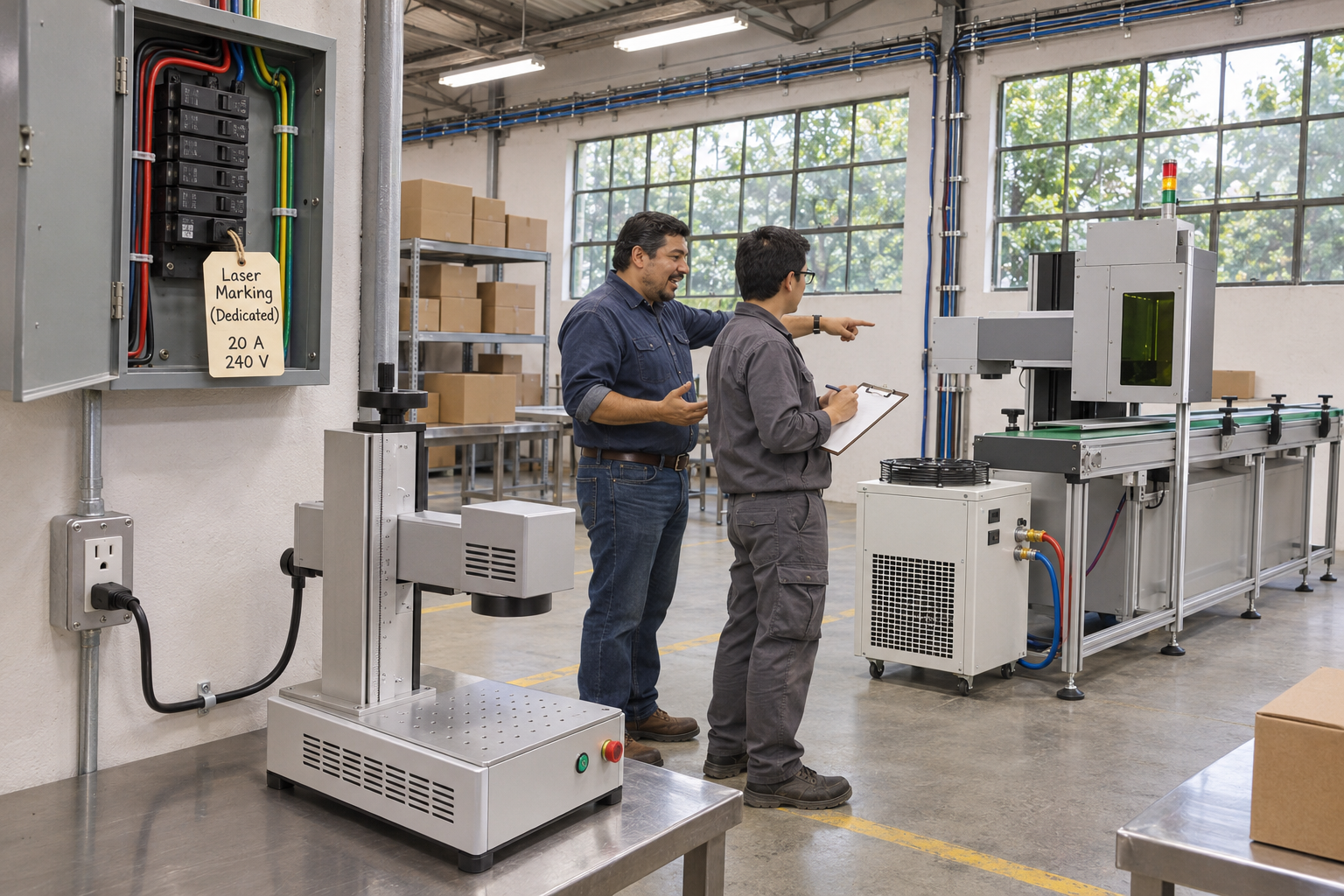
This question splits into two camps, and I hear both from buyers. Let me address each one directly.
Objection one: "A standard outlet is enough"
For a small air-cooled fiber marker, this is often correct. If the outlet is grounded, rated for the machine's current, and not shared with heavy equipment, the machine will run fine. Small workshops with low-volume production choose this path all the time, and we support it when the manual permits it.
But "standard voltage" does not mean "any wall socket." The outlet must still match the plug type. The cable must carry the rated current. And the circuit must not already feed a heater or compressor.
Objection two: "Every CCD machine needs a dedicated industrial circuit"
This is the right call for high-power, water-cooled, or conveyorized equipment. One factory installation specification we work to requires at least 2,500W of single-phase AC capacity, connected through protective switching equipment. A larger marking system with a 16A fuse at 230V also belongs on its own circuit. The CCD camera did not create that need. The complete system did.
Standard outlet versus dedicated circuit
| Factor | Standard grounded outlet | Dedicated branch circuit |
|---|---|---|
| Suitable load | Under about 500W, air-cooled | 2,200W and above, or any chiller/conveyor |
| Breaker | Shared with other devices | Sized to the machine's rated current only |
| Risk of trips | Higher when motors start nearby | Low |
| Electrical interference | Possible from welders, presses, compressors | Minimized |
| Fault diagnosis | Harder, intermittent issues | Easier, isolated circuit |
What a dedicated circuit protects you from
A dedicated circuit avoids voltage dips when a compressor starts. It avoids breaker trips mid-job. It avoids electrical interference from welding equipment on the same line, which can cause the vision system to misread a part. One operating manual we reference is blunt about this. Do not share the fuse with other devices.
Protection devices you should plan for
Here is the short process our engineers recommend to the customer's electrician:
- Read the rated current from the electrical document, then select a breaker or fused disconnect to match it. Oversizing hides faults. Undersizing causes nuisance trips.
- Account for inrush current from chillers, pumps, and motors at startup.
- Add surge protection where the manual permits it. One manufacturer's manual calls for surge protection rated above 2,000 joules. Treat that as a model-specific instruction, not a universal rule.
- Skip power strips and ordinary extension cords for anything above a benchtop load.
- Provide a lockable isolation switch for service work if local code requires it.
- Confirm the emergency stop removes hazardous operation, not just computer power.
Do I need a voltage stabilizer or UPS backup for my CCD laser marking system?
Every quotation forces us to weigh one trade-off: add a stabilizer and UPS to the package, or trust the buyer's grid. We now ask about grid quality before deciding.
You need a voltage stabilizer if your grid fluctuates more than ±5%, because unstable voltage causes inconsistent laser output. An online pure sine wave UPS is recommended for the industrial PC and vision controller to prevent data loss during micro-outages. Stable grids may need only surge protection.

The ±10% tolerance printed on many spec sheets confuses people. It is a survival limit, not an operating target. One operating manual we follow asks for voltage fluctuation under 5% for consistent marking. I explain the difference like this. The machine will power on at 198V. It will not mark consistently if the voltage swings between 198V and 242V every minute.
When a voltage stabilizer becomes mandatory
Ask your local utility or measure the line yourself over a working day. If the swing exceeds ±5%, plan for a voltage stabilizer. We see this most often in industrial zones with large motor loads, and in some markets where the grid is under strain in summer. The laser power supply is sensitive to this. Unstable input shows up as uneven mark depth and faded contrast.
If you also need a transformer because your grid is 110V and the machine is single-phase 220V, size it from the machine's full apparent power plus startup demand. An undersized transformer is a common and expensive mistake.
What a UPS actually protects
An uninterruptible power supply is not meant to keep the laser marking during a blackout. It is meant to protect the industrial PC power, the vision controller, and the software workstation. A micro-outage of a few hundred milliseconds can corrupt job files or reset the camera calibration. An online UPS 5 with pure sine wave output isolates those electronics from the grid at all times and gives you time to shut down cleanly. Do not try to run a 2,500W machine with chiller on a small office UPS.
Stabilizer, UPS, and surge protector compared
| Device | Problem it solves | Protects | When we recommend it |
|---|---|---|---|
| Voltage stabilizer | Sustained voltage fluctuation above ±5% | Laser power supply, marking consistency | Unstable industrial grids, shared factory feeds |
| Online pure sine wave UPS | Micro-outages, brownouts, data corruption | Industrial PC, vision controller, software | Any automated production line where downtime is costly |
| Surge protection | Transient spikes from lightning or switching | All electronics | Almost every installation, where the manual permits |
The hidden issue: electrical noise
A stabilizer fixes slow voltage swings. It does not fix fast electrical noise. That is a different problem, and it is where the CCD system matters most. Our electrical cabinets include EMI filters so the sensitive camera and lighting are shielded from electromagnetic interference. The vision processing unit 6 is also galvanically isolated from the high-power laser driver. Without that isolation, you can see image jitter, false positioning, and missed marks. We also pay attention to high-frequency harmonic feedback into the facility grid, since it can disturb other precision instruments in the same workshop.
So when a buyer asks whether they need three-phase power, a separate line, a stabilizer, or a transformer, the answer is almost always a question back. What does your grid look like, and what else is on the circuit?
How much electricity will my CCD automatic laser marking machine consume during daily production?
One lesson our solution design engineers learned the hard way: a buyer sees "30W fiber laser" and expects a 30W electricity bill. The chiller and conveyor tell a different story.
A compact air-cooled CCD fiber marking machine consumes under 500W, roughly 4kWh in an eight-hour shift at full load. Larger industrial systems with chillers, exhaust, and conveyors consume 2,200–2,640W or more, around 18–21kWh per shift. Actual usage depends on duty cycle and idle time.

The right way to estimate consumption is to add up every device on the line. The power consumption rating on the nameplate covers the marker itself. It often does not cover the accessories you bolt on later.
An illustrative load calculation
The numbers below are an example, not a nameplate rating. Your supplier's electrical document controls. But the method is what matters.
| Component | Example load | Notes |
|---|---|---|
| Fiber laser source and power supply | 300W | Dominant load on compact systems |
| Marking controller and galvo | 100W | Continuous while powered |
| Industrial PC and monitor | 150W | Runs the visual positioning system |
| CCD camera and LED illumination | 30W | Small but needs clean power |
| Conveyor motor and PLC | 250W | Only on automated production line setups |
| Water chiller | 800W | Only for water-cooled UV or high-power fiber |
| Exhaust fan | 150W | Separate motor load |
| Illustrative total | 1,780W | Have an electrician size the circuit from the real figures |
Look at that table again. The camera and lighting sit near the bottom. The chiller sits near the top. This is why I keep repeating that the CCD package is an operational concern, not a power concern.
Turning watts into a daily figure
Multiply total watts by operating hours, then divide by 1,000 to get kWh. The illustrative system above at 1,780W for eight hours gives about 14kWh if everything ran at full load all day. In reality, marking is intermittent. The laser idles between parts. The conveyor stops and starts. Real consumption is usually well below the full-load figure. Measuring actual draw for one week gives you the honest number for cost planning.
Environment changes consumption too
Heat makes cooling work harder. One compact CCD fiber specification lists an operating range of 10–40°C and 5–85% humidity. Another system lists 10–35°C and 5–75%. Outside those ranges, the chiller runs longer and fans spin faster. Dust on filters has the same effect. So a clean, temperature-controlled workspace lowers both electrical demand and maintenance cost.
Where power monitoring is heading
Two trends are worth watching. First, IoT-enabled power monitoring can log current draw per device. Subtle rises in the laser's current over months can signal diode degradation before output drops, which supports predictive maintenance. Second, some automated cells are moving toward a centralized 48V DC bus for the low-voltage electronics. That reduces the number of individual AC-DC converters inside the cabinet, cuts internal heat, and improves efficiency. Neither trend changes your facility voltage, but both improve how well you understand what the machine really uses.
Conclusion
Your CCD automatic laser marking machine rarely needs exotic power. It needs the right voltage, a grounded dedicated circuit when loads grow, and stable supply. Confirm specs before installation.
Footnotes
1. Official U.S. government resource for international trade standards and technical regulations. ↩︎
2. Authoritative overview of machine vision and visual positioning technologies used in industrial automation. ↩︎
3. The IEC sets international standards for electrical safety and protective earthing systems. ↩︎
4. ISO provides international standards for industrial electrical documentation and safety symbols. ↩︎
5. Technical explanation of UPS types and their role in protecting sensitive industrial electronics. ↩︎
6. IEEE is the leading authority on electrical engineering and signal processing hardware standards. ↩︎